


The Local Administrator 09: Counting Licenses

Jan 05, 2026
 236
236
Overview
Counting licenses is a useful process for local administrators to understand current license availability and to anticipate future enrollment needs.
This tutorial explains how to:
- View your current license count
- Understand what the license count represents
- Identify where to find license expiration information
Step 1: Access the License Count
- Log in to your administrator account.
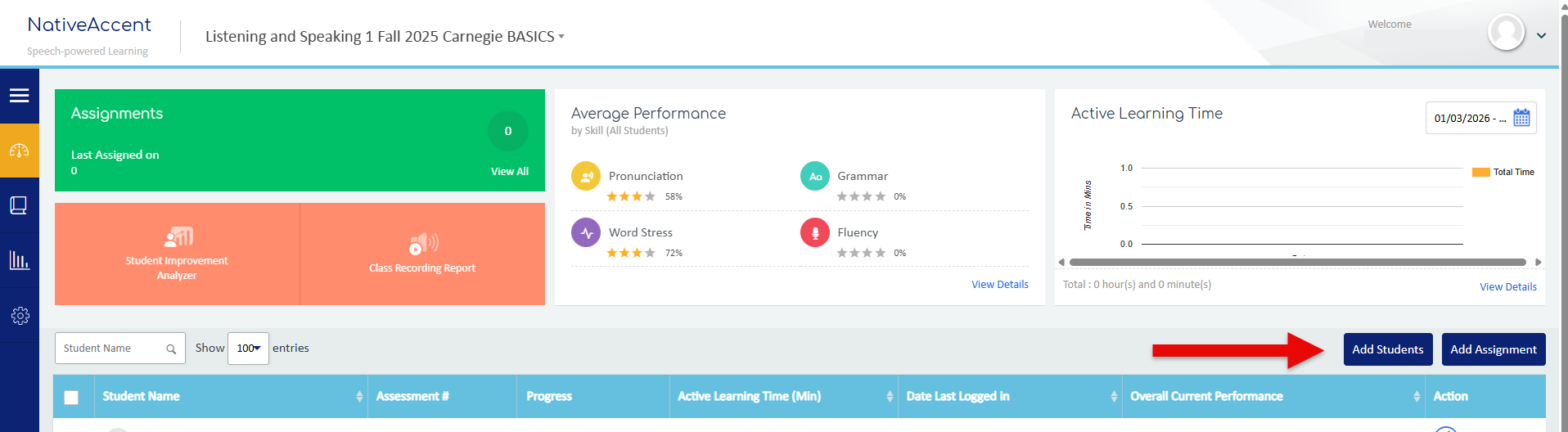
- Navigate to the Add Students button.
- Click Add Students to open the enrollment window.
 Step 2: Review
Available Licenses
- In the upper-right corner of the enrollment window, you will see the current license count
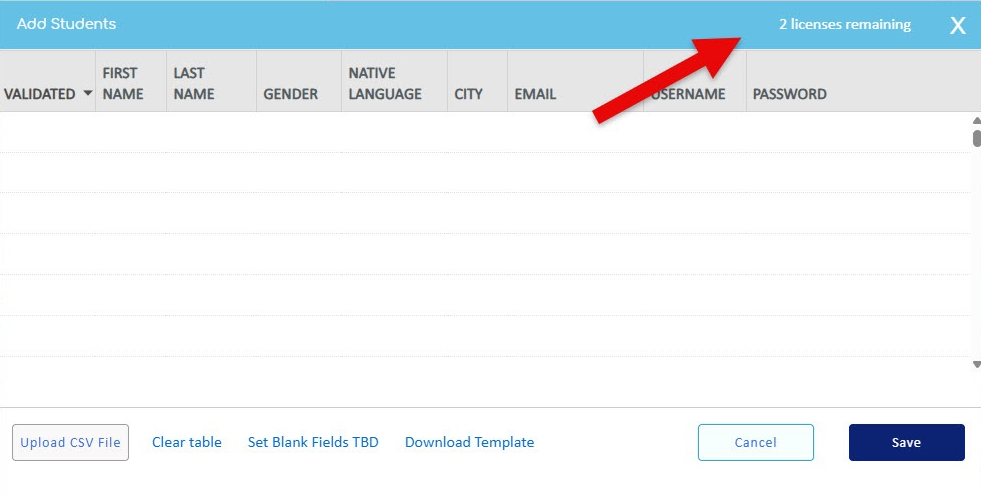
- This number represents the total licenses available for enrolling students at that time.
✅ This count helps you confirm whether you have sufficient licenses to enroll additional students.
Important Note: License Expiration
The license count displayed in the Add Students window does not show expiration dates.
- To determine when licenses expire, you must refer to your licensed delivery documentation.
- This documentation contains the authoritative information for:
- License start and end dates
- Purchase terms
- Renewal details
Best Practice
- Review your license count regularly, especially before enrollment periods.
- Cross-check availability with your licensed delivery documentation to avoid expired or insufficient licenses.
Summary
- Add Students window → shows available license quantity
- Licensed delivery documentation → shows license expiration details
Using both together ensures accurate license management and uninterrupted student enrollment.

